How to use QTP to save and retrieve a Quality Center Test Resource

Sometimes in your QTP script you need to save and retrieve data stored in a text file across multiple machines. Quality Center has a ‘resource’ module where you can store a resource like a text file. I use this functionality so much that I created two QuickTest Professional functions specifically for this:
- QcSaveToResource – This function will save a text file from a local machine to an existing resource in QC
- QCGetResource – This function will copy a file stored in QC to a local drive.
( Also check out my video : How to get a QC resource using QTP with OTA)
How to save a text file to QC (QcSaveToResource)
The following code will save a text file from a QuickTest Pro lab machine to an existing ‘Test Resource’ in QC’s Test Resource module:
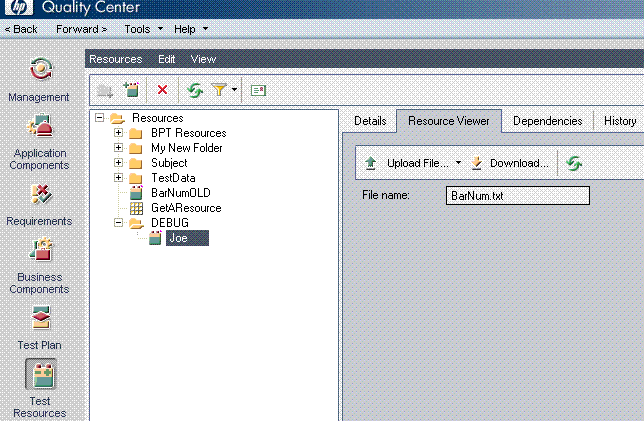
QcSaveToResource "Joe","qcresourcetest.txt","C:QTPAUTOMATIONDATA","",""
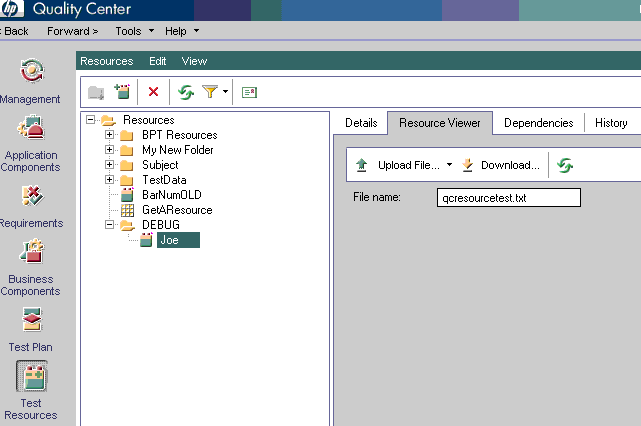
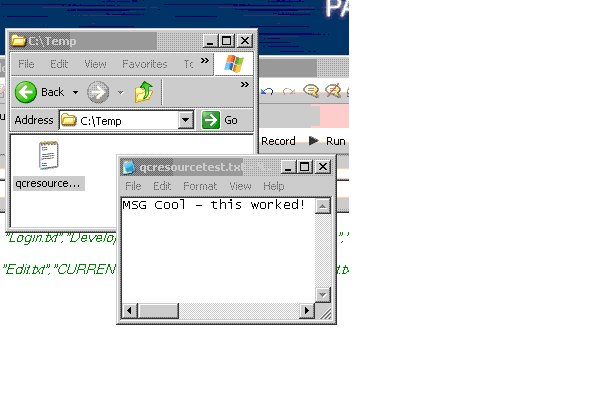
How to get a Quality Center test resource and save to a local dir (QCGetResource)
QCGetResource "qcresourcetest.txt","C:Temp"
QTP QC function that you can use!
'------------------------------------------------------------
'
'@Function Name: QCSaveToResource

'@Documentation Saves a text file to the QC Test Resources module

'@Created By: Joe Colantonio

'@Return Values: NONE

'@Example: QcSaveToResource "Joe","qcresourcetest.txt","C:QTPAUTOMATIONDATA","",""

'-----------------------------------------------------------
Function QCSaveToResource(QcResourceName,fileNameToSave,fileToSavePath,resourceType,opt)
'**************************

'Upload a resource

'**************************

Set qcConn = QCUtil.QCConnection

Set oResource = qcConn.QCResourceFactory

Set oCurrentResources =oResource.NewList("")

Set oNewResource = Nothing
resourceCount = oCurrentResources.Count
For iNowResourceNum = 1 To resourceCount
nowResource =

 oCurrentResources.Item(iNowResourceNum).Name

   if UCase(nowResource) = UCase(QcResourceName) then

    Set oNewResource = oCurrentResources.Item(iNowResourceNum)

    resourceFound = "True"

   end if


Next

If resourceFound = "True" Then

 oNewResource.Filename = fileNameToSave

 oNewResource.ResourceType = "Test Resource"
 oNewResource.Post

 oNewResource.UploadResource fileToSavePath, True

Else

 reporter.ReportEvent micFail,"Did not find a resource in the Test Resource module named " & QcResourceName,"Verify that a resource exist in the QC Test Resource module!"

End If

Set oCurrentResources = Nothing

Set oResource = Nothing

End Function
'------------------------------------------------------------
'
'@Function Name: QCGetResource

'@Documentation Saves a text file from a QC Test Resource to a local dir

'@Created By: Joe Colantonio

'@Return Values: NONE

'@Example: QCGetResource "qcresourcetest.txt","C:Temp"

'-----------------------------------------------------------
Function QCGetResource(resourceName,saveTo)
Set qcConn = QCUtil.QCConnection

Set oResource = qcConn.QCResourceFactory

Set oFilter = oResource.Filter
  oFilter.Filter("RSC_FILE_NAME") = resourceName

Set oResourceList = oFilter.NewList

If oResourceList.Count = 1 Then

  Set oFile = oResourceList.Item(1)
oFile.FileName = resourceName
oFile.DownloadResource saveTo, True

End If

Set qcConn = Nothing

Set oResource = Nothing

Set oFilter = Nothing

Set oFlieList = Nothing

Set oFile = Nothing
End Function

Joe Colantonio is the founder of TestGuild, an industry-leading platform for automation testing and software testing tools. With over 25 years of hands-on experience, he has worked with top enterprise companies, helped develop early test automation tools and frameworks, and runs the largest online automation testing conference, Automation Guild.
Joe is also the author of Automation Awesomeness: 260 Actionable Affirmations To Improve Your QA & Automation Testing Skills and the host of the TestGuild podcast, which he has released weekly since 2014, making it the longest-running podcast dedicated to automation testing. Over the years, he has interviewed top thought leaders in DevOps, AI-driven test automation, and software quality, shaping the conversation in the industry.
With a reach of over 400,000 across his YouTube channel, LinkedIn, email list, and other social channels, Joe’s insights impact thousands of testers and engineers worldwide.
He has worked with some of the top companies in software testing and automation, including Tricentis, Keysight, Applitools, and BrowserStack, as sponsors and partners, helping them connect with the right audience in the automation testing space.
Follow him on LinkedIn or check out more at TestGuild.com.
Related Posts

Mobile testing is the systematic process of evaluating mobile applications to ensure they function correctly, provide excellent user experience, and […]

Love it or hate it—Behavior Driven Development is still widely used. And unfortunately still miss-understood. You’ve probably heard a lot […]

ETL stands for Extraction, Transformation, and Load (ETL). How do you test it? This guide covers what you need to know to get started.

I originally wrote this post in 2012 but I still get email asking if it is still possible to use […]