Open Test Architecture How to Update a Test Plan Field (OTA)

I originally wrote this post in 2012 but I still get email asking if it is still possible to use open test architecture (OTA) to update a Test Plan Field in ALM/QC? Even thought lots have change since I wrote this (including UFT getting acquired by OpenText) this code should still work.
This should also be true for my past posts on How to Update a Defect using OTA and How to Update a Test Set Field Using OTA
So follow along to discover how to update information for an ALM Test Plan using HP’s Open Test Architecture (OTA).
But first.
How to get the QC/ALM field name
In order to update a field in ALM using OTA you will need to know the backend name that ALM assigns to the field. This name is normally different than the label name that you might see in the ALM Test Lab section.
If you don’t know what the actual field names are, you can easily find them by going into QC’s Tools>Customize.
In the Project Customization section and go into the “Project Entities” section.
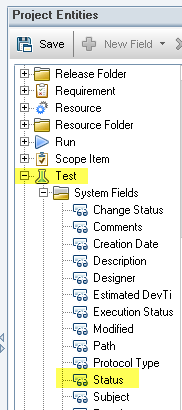
Under the Project Entities Tree view click expand Defect and click on your System Folder or User Fields. Clicking on a field will reveal the field name that you will need to use.
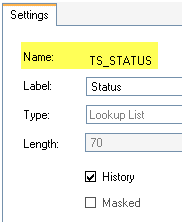
For this example I want to find the System Field > Status and get the name value for it (TS_STATUS)
OTA Code to Update a Test Plan Field in an ALM/QC Test Lab
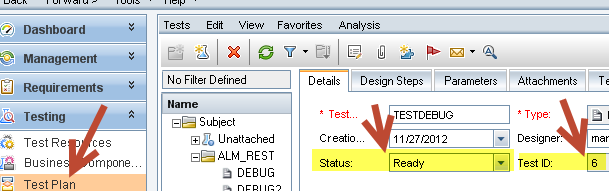
The following example updates the ‘Test Plan’ that has the ‘Test Set ID’ of 6 and changes the ‘Status’ field to Ready.
The code is pretty straight forward and uses the OTA’s TestFactory object to accomplish our goal.
- Creating an instance of the TestFactory object allows us to access all the services needed to manage tests.
- Next you set the Filter property to set the ID for the test set that you want to update.
- Finally use the TestFactory’s NewList method to create a list of object that matches your specified filter.
- Make sure to use the Post method to actually write the changed values to your ALM database
- Here is the Open Test Architecture code:
'=========================================
set tdc = createobject("TDApiOle80.TDConnection")
tdc.InitConnectionEx "http://yourURL/qcbin"
tdc.Login "yourName","yourPassword"
tdc.Connect "yourDomain","yourProject"
'=========================================
testPlanID = 6
Set TestList = tdc.TestFactory
Set TestPlanFilter = TestList.Filter
TestPlanFilter.Filter("TS_STATUS") = testPlanID

Set TestPlanList = TestList.NewList("")
Set myTestPlan = TestPlanList.Item(testPlanID)
myTestPlan.Field("TS_STATUS") = "Ready"
myTestPlan.Post

Set TestPlanFilter = Nothing
Set myTestPlan = Nothing
Set TestList = Nothing
Set TestPlanFilter = Nothing
How Update All Tests
There might be times when you need to update the same field for all the tests in your test plan. To update the same field for all your tests you could create Open Test Architecture code that loops thru all the tests:
'=========================================
set tdc = createobject("TDApiOle80.TDConnection")
tdc.InitConnectionEx "http://yourURL/qcbin"
tdc.Login "yourName","yourPassword"
tdc.Connect "yourDomain","yourProject"
'=========================================
Set TestList = tdc.TestFactory
Set TestPlanFilter = TestList.Filter
Set TestPlanList = TestList.NewList("")
For each tpTest in TestPlanList
 Set myTestPlan = TestPlanList.Item(tpTest.ID)
 myTestPlan.Field("TS_STATUS") = "Ready"
 myTestPlan.Post
Next
Set TestPlanFilter = Nothing
Set myTestPlan = Nothing
Set TestList = Nothing
Set TestPlanFilter = Nothing
How to run the code
To run the defect code you can either place it in QTP and run as a script or place the code in a text file and save as a .VBS vbscript file.
Good Luck!

Joe Colantonio is the founder of TestGuild, an industry-leading platform for automation testing and software testing tools. With over 25 years of hands-on experience, he has worked with top enterprise companies, helped develop early test automation tools and frameworks, and runs the largest online automation testing conference, Automation Guild.
Joe is also the author of Automation Awesomeness: 260 Actionable Affirmations To Improve Your QA & Automation Testing Skills and the host of the TestGuild podcast, which he has released weekly since 2014, making it the longest-running podcast dedicated to automation testing. Over the years, he has interviewed top thought leaders in DevOps, AI-driven test automation, and software quality, shaping the conversation in the industry.
With a reach of over 400,000 across his YouTube channel, LinkedIn, email list, and other social channels, Joe’s insights impact thousands of testers and engineers worldwide.
He has worked with some of the top companies in software testing and automation, including Tricentis, Keysight, Applitools, and BrowserStack, as sponsors and partners, helping them connect with the right audience in the automation testing space.
Follow him on LinkedIn or check out more at TestGuild.com.
Related Posts

Mobile testing is the systematic process of evaluating mobile applications to ensure they function correctly, provide excellent user experience, and […]

Love it or hate it—Behavior Driven Development is still widely used. And unfortunately still miss-understood. You’ve probably heard a lot […]

ETL stands for Extraction, Transformation, and Load (ETL). How do you test it? This guide covers what you need to know to get started.

Quality is most likely foremost in your mind when building a new product, but have you ever looked deeper into […]