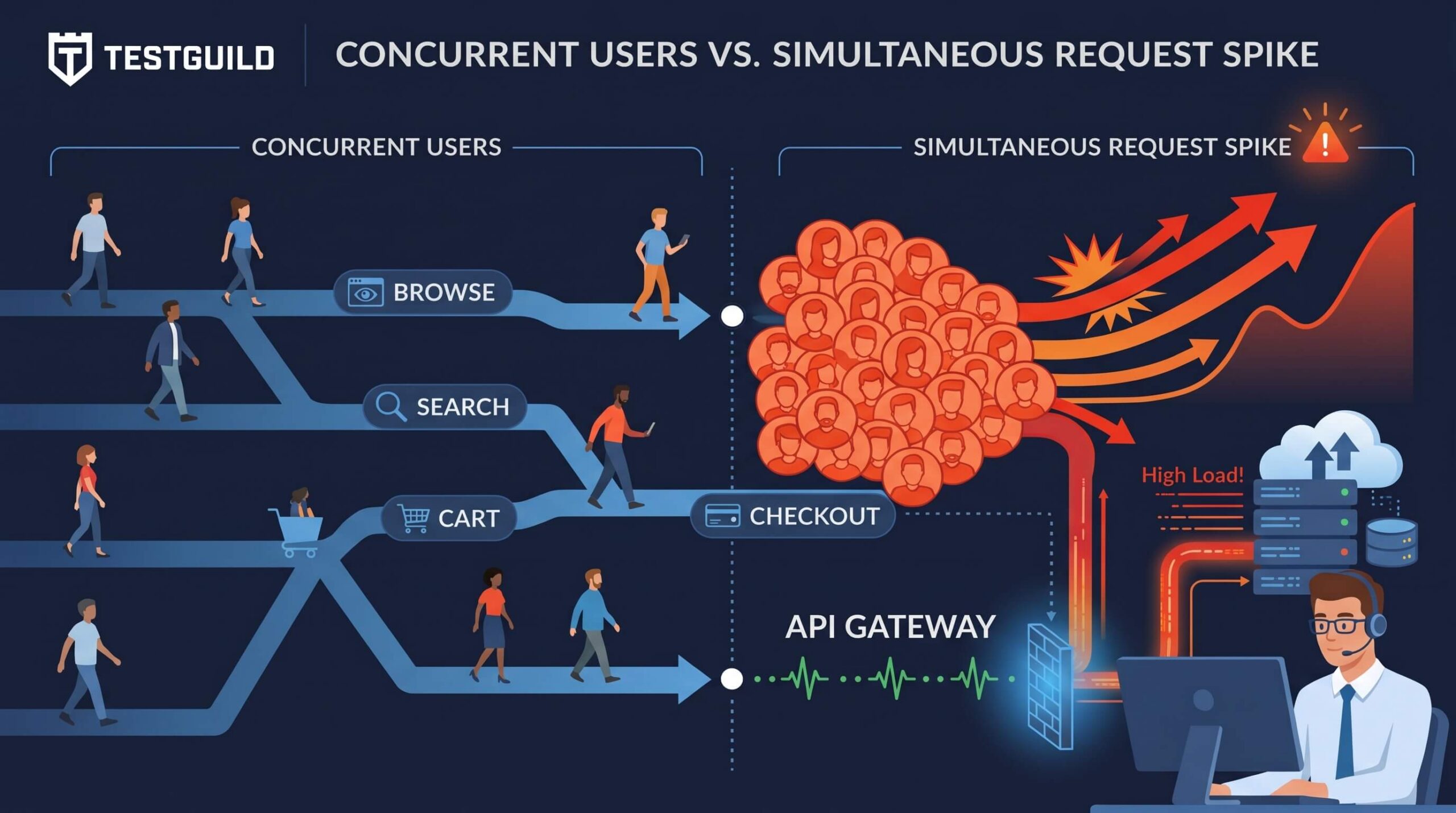
Concurrent users are the people or virtual users who are active in an application during the same time window. They do not all need to send the same request at the same instant. A realistic performance test also defines what those users do, how often they act, how long they wait, and the request rate their behavior creates.
And if you’re new to performance testing, this is one of the first concepts you’ll need to grasp is what concurrent users are.
This may come up, for instance, when a manager comes to you — the performance tester — and ask how many concurrent users your site/application can handle. It sounds straightforward enough, but many people don’t really understand what the term “concurrent user” means from a performance testing perspective.
Concurrent users are a key performance testing concept. This was true when I first wrote this in 2014 and still true today.
For example a test with 500 concurrent users can be realistic, wildly unrealistic, or somewhere in between. The difference is the workload behind the number. Are those users browsing product pages, signing in, checking out, uploading files, or repeatedly hitting one API? Are they active for ten seconds or ten minutes? Are they paced like real people, or are they sending requests as fast as the test tool can run?
This guide explains the difference between concurrent users and simultaneous requests, shows how to choose a credible starting load, and gives you a practical way to describe the workload so that your results mean something.
Concurrent users are not the same as simultaneous requests
A concurrent user is active within the same test period as other users. That user may be reading a page, waiting for a response, deciding what to do next, searching, adding an item to a cart, or submitting a form.
A simultaneous request is narrower. It happens when many users trigger the same—or similarly expensive—action at nearly the same moment. For example, hundreds of customers may submit an order seconds after a limited-time promotion opens, or thousands of employees may sign in just before a company-wide meeting.
The difference matters because applications respond to the traffic they actually receive, not to a headline number alone. A group of users can be concurrent while their actions are naturally spread across time. That same population can produce a burst of simultaneous requests if an event causes them to take one action together.
Performance Testing Measures
Concurrent active users / virtual users
What it answers:
How many users are active during the test window?
Example: 500 users browse, search, and check out during a 15-minute campaign window.
Simultaneous requests
What it answers:
How many requests hit a particular action at nearly the same moment?
Example: 200 users submit checkout within a few seconds.
Requests per second (RPS )
What it answers:
How much request rate reaches an application or API?
Example: All journeys together create 150 API requests per second.
A terminology note: Test tools use slightly different labels. Azure Load Testing calls a test-tool actor a virtual user, while Apache JMeter commonly calls it a thread. Neither term is automatically the same as a real, logged-in human user or an open network connection. Define what your team means before you compare results.
Let’s Imagine a Peformance Testing Scenario

Let’s revisit the gas-station example that I’ve used in previous posts — what is throughput.
Imagine a busy station with two customers in the restroom, five ordering coffee, three pumping gas, and two waiting for service. That is 12 concurrent customers. They are all active in the same environment, but they are using different services and placing different demands on the station.
Now imagine a sudden rush where every customer drives to the pumps at once. That is a burst of simultaneous activity focused on one resource. The pumps, payment terminals, and forecourt traffic now experience a concentrated demand that is different from the normal mixed workload.
Your application behaves the same way. A production workload is usually a mix of journeys, each with its own pace and backend footprint. A good performance test models that mix. A useful stress test can intentionally collapse that mix into a concentrated burst to see where the system fails, but it should not be mistaken for a normal-capacity test.
Why a user count alone is not a workload
“Test with 500 concurrent users” is incomplete. To turn that number into a test that the business can trust, define the workload in plain language.
For each user journey, identify the percentage of traffic that takes that path, the important actions in the path, the time a person normally spends between actions, the data that varies from user to user, and the business result that would count as failure. Then observe the resulting request rate, response-time distribution, error rate, and server-side resource use.
For example, an illustrative 500-user retail workload might include 55% browsing or searching, 25% viewing product details, 15% changing a cart, and 5% checking out. Browsing may mostly exercise caching and search. Checkout may touch payment, inventory, fraud, and order services. The five percent checkout path can therefore be the most business-critical part of the test even though it has the smallest user share.
Do not treat those percentages as a template for every application. Build your distribution from production analytics, logs, product knowledge, support incidents, and upcoming events. The goal is to recreate the demand pattern that creates business risk, not to make a test tool show a large number.
How to calculate a starting concurrent-user target
There is no universal “correct” user count, but two calculations can give you a defensible starting point. Treat each as an estimate with stated assumptions, then validate it against production telemetry.
Method 1: Start with peak active sessions
If you have peak-hour session data and average session duration, estimate the average number of active sessions in that hour with this calculation:
Concurrent users ≈ peak-hour sessions × average session duration in seconds ÷ 3,600
For example, suppose your busiest 2:00–3:00 PM hour has 3,600 sessions and the average session lasts 150 seconds:
3,600 sessions × 150 seconds ÷ 3,600 seconds = 150 concurrent sessions
That produces a baseline of 150 active sessions. It does not mean that every one of those users makes a request every second. It means that, on average, 150 sessions overlap during that peak hour.
Grafana k6 documents this peak-hour approach and recommends using hourly data rather than monthly or daily averages, because averages often conceal the periods that actually challenge your system. Add a justified safety margin for expected growth or campaign demand, then design separate spike and stress tests for abnormal events.
Method 2: Start with a required request rate
Sometimes the business requirement is clearer in terms of throughput: “The API must sustain 100 requests per second,” for example. For a simple closed-loop request model with no think time, a useful starting relationship is:
Virtual users ≈ target RPS × average response time in seconds
If an API responds in 0.2 seconds on average and you need 100 RPS, the starting estimate is 20 virtual users. Microsoft documents this relationship for configuring a target request rate in a load test.
The caveat is important. Real user journeys include more than one request, and real people pause between actions. A complete test therefore needs the journey mix, think time, and the resulting RPS—not only this formula. As response time rises, a closed-loop test can also keep more users occupied for longer, which changes the measured behavior.
“We built a nice open source toolbox to calculate the session time, how many concurrent users you use, and all that stuff.” — Josef Mayrhofer, founder of Performetriks, on the TestGuild Performance Podcast
Mayrhofer’s point is the practical one: concurrent users and session time belong together. A capacity plan that ignores session duration, pacing, and transaction behavior is not a workload model yet.
Think time makes a production-like test more believable
Think time is the intentional pause between actions in a test script. It represents the time a real person spends reading a page, choosing an option, entering information, or deciding what to do next.
Without realistic pacing, a modest number of virtual users can generate a request rate that no production audience would create. That can be useful for a deliberately aggressive test, but it is misleading if the result is labeled “normal load.”
TestGuild’s load-testing best practices explain why realistic think time, a credible workload profile, and a planned ramp-up protect teams from false alarms.
There is one useful exception. A short performance smoke test in continuous integration may intentionally use a very small scope, little or no think time, and low concurrency. Its job is to expose obvious regressions quickly after a change. Label it as a CI smoke test, not as evidence that the application can handle production demand.
Run the test in phases: ramp up, steady state, and analysis
A capacity test should not instantly turn on every user unless the real event you are modeling does that. A gradual ramp-up shows how the system behaves as demand increases and can help distinguish a slow capacity trend from an artificial login storm.
A practical test has three phases:
- Ramp-up: Add users according to the expected demand profile.
- Steady state: Hold the intended load long enough to evaluate latency percentiles, throughput, errors, queues, database behavior, and resource saturation.
- Ramp-down and analysis: Let the workload end, observe recovery, and correlate client-side failures with traces, logs, and infrastructure metrics.
During steady state, do not rely on an average response time alone. Review p50, p95, and p99 response times where they are meaningful, successful and failed transactions, RPS/TPS, CPU and memory use, database saturation, queue depth, cache behavior, and dependency failures. For a deeper walkthrough, see TestGuild’s guide to response-time testing and its discussion of continuous performance engineering.
Load test vs. stress test
A load test evaluates the system under an expected or planned workload. It asks whether the application meets the agreed service levels at a realistic mix of actions, volume, and pace.
A stress test goes beyond the expected workload to reveal limits, graceful degradation, recovery behavior, and failure modes. It may deliberately send far more users or simultaneous requests than normal operations would create.
Both are valuable. The problem begins when a team runs a stress pattern—such as a few users hammering an endpoint with no think time—and reports the outcome as normal-load capacity. Be explicit about the test objective before the test begins.
Frequently asked questions
Are concurrent users the same as simultaneous users?
No. Concurrent users are active during the same time period, and their actions may be spread over time. Simultaneous requests are a narrower burst in which many users take an action at nearly the same moment.
How many concurrent users should I test?
Start with peak production behavior rather than a round number. Use peak-hour session data, typical session duration, user-journey distribution, observed RPS, known high-risk transactions, and planned growth. Then define a separate spike or stress target if you also need to test abnormal demand.
Are virtual users the same as real users?
No. A virtual user is a test-tool representation of behavior. It is useful only when its journeys, pacing, data, and request volume resemble the real workload the system must support.
Can I calculate concurrent users from RPS?
You can create a starting estimate from target RPS and average response time, but it comes with assumptions. A full user journey may contain several requests and think time, so validate the model by observing the actual RPS and behavior produced by the test.
Should every performance test include think time?
Production-like journey tests normally should. A short CI smoke test can intentionally omit it to find regressions quickly, as long as the test is clearly described and not used to claim production capacity.
The key takeaway
Concurrent users are a useful performance-testing measure, but they are not the finish line.
The reliable question is not simply, “Can we handle 500 users?” It is:
“Can we meet our service objectives when 500 active users follow this realistic mix of journeys, at this pace, producing this level of demand?”
When you define the behavior behind the number, your load test becomes easier to trust, easier to reproduce, and much more useful for finding the bottleneck that matters.