Gatling Studio Review 2026: What Gatling’s Creator Showed Me
Look, performance testing has the biggest gap between “we should really do that” and “we actually do that” of any testing discipline.
I’ve talked to 500+ tool creators on my podcast over 25 years .
I see it everywhere. So when Stéphane Landelle, the guy who literally created Gatling, came back on the show (Episode A570) with Shaun Brown to walk me through what they’ve spent years building, I paid close attention.
Here’s my honest review of Gatling Studio after seeing it demoed live.
Here’s what I saw.
What Is Gatling Studio?
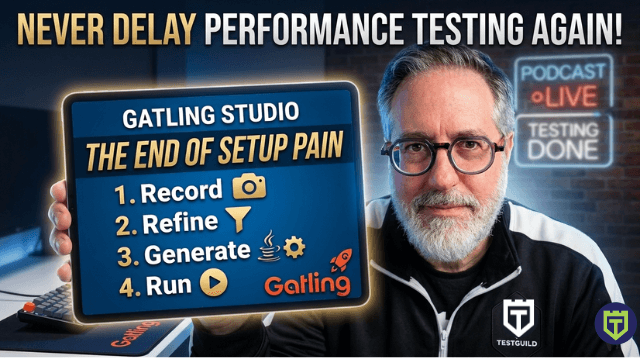
Gatling Studio is a free standalone desktop app (Windows, Mac, Linux) that takes you from zero to a working load test by recording what you actually do in a browser. Cool! No proxy setup, no certificate juggling, no scripting from a blank page.
The four-step flow:
- Record — Studio opens a dedicated browser. Browse your app the way a real user would.
- Refine — Filter out static assets and irrelevant domains with a visual interface.
- Generate — Studio exports a clean, fully structured Java Maven Gatling project.
- Run — Open in your IDE and run locally, or push to Gatling Enterprise for distributed load.
I watched Shaun demo this live on the podcast. He recorded a complete e-commerce buyer journey, filtered it, and had working exported code in under five minutes. I’ve seen a lot of tool demos. That one moved fast.
Why the Setup Problem Was Always the Real Problem
Look, “record and replay” isn’t a new concept. I’ve seen it in LoadRunner, JMeter, a dozen others. So you might be wondering, what’s actually different here?
Here’s the thing: the recording was never really the hard part. The hard part was everything you had to do before you could even hit record.
The original Gatling Recorder worked as a proxy , meaning you had to configure your browser to route traffic through it, install a root certificate so it could inspect HTTPS, and know enough about certificate management to make that work without breaking everything else.
“The setup was cumbersome. It required familiarity with root certificates and man-in-the-middle configuration that most developers and SDETs just don’t have.”
— Stéphane Landelle, creator of Gatling (Episode A570)
That’s a 30-45 minute setup tax just to get to the starting line. For teams who aren’t performance specialists, that’s often where the whole effort dies.
Studio replaces that with an Electron-based browser that captures your traffic directly. You open the app, log in, click record, and browse. No proxy. No certificate. No IT ticket.
That might sound like a small change. But removing that specific friction is the difference between “we keep meaning to add performance tests” and “we added performance tests last sprint.”
Podcast Connection: Stéphane told me they first tried building a browser extension before landing on Electron. The browser vendors kept restricting the APIs extensions could access and progressively sunsetting them. Worth mentioning because it shows how much thought went into getting this right — not just shipping the first thing that kind of worked.
The Scenario Filtering: The Part That Usually Takes an Hour
After you record your session, Studio shows you a filtering modal. This is where you decide:
- Which domains to include — cut out third-party analytics, ad trackers, CDN calls you don’t care about
- Whether to include static resources — images, CSS, JavaScript (typically excluded from load tests since you’re testing your app server, not a CDN)
In the old workflow, you’d do this manually after export, picking through hundreds of captured requests, deleting the ones you don’t want, modifying the generated script. Which requires you to already understand the scripting DSL.
Here you make those decisions visually before a single line of code is generated. It’s the right order of operations, and it’s going to save a lot of people a lot of frustration.
Find the Right Performance Tool For You Now with our Tool Matcher
What the Generated Code Actually Looks Like
The output is a complete Java Maven project with:
- A simulation class with your full user journey — every request, with realistic pauses between steps based on your actual timing
- A setup block pre-configured with one virtual user so you validate the script works before scaling up
That default of one user is smart design. A huge number of teams record a script, immediately run it with hundreds of virtual users, hit errors, and give up. Those errors were usually in the script, not the tool — but you’d never know because you can’t isolate them. Starting with one user lets you confirm the journey completes successfully first. Then you adjust the setup block to match your actual load profile.
Real Talk: The setup block is where a lot of teams leave performance value on the table. The injection profile, how users ramp up, peak, and ramp down, matters a lot for realistic results. Don’t just set it to 500 users and call it a load test.
The Language Question
When Gatling first launched, it was Scala only. And while Stéphane still loves Scala the core of Gatling is still written in it, he acknowledged it has a reputation for complexity that may scare some testers off.
Where things stand in 2026:
- Java/Kotlin — Added ~5 years ago, now equal to Scala in usage volume
- JavaScript/TypeScript — Added ~2 years ago, growing steadily
- Scala — Still fully supported
Studio currently exports Java + Maven only. More language targets are in the pipeline. If your team is TypeScript-native, you’ll need to either wait or port the exported code — which isn’t a heavy lift if you’re already familiar with the Gatling SDK.
What’s Not in the First Release (And What’s Coming)
This is an MVP, and Stéphane said so plainly. I appreciate that honesty.
The main gap right now is correlation — the automated detection of dynamic values (session tokens, CSRF tokens, transaction IDs) that change between runs and need to be captured from responses and replayed in subsequent requests. Without it, scripts that hit authenticated flows or stateful APIs will need some manual work after export.
It’s on the roadmap for the next release, and Stéphane said they’re weighing whether to solve it with AI or traditional pattern matching. Here’s why they’re leaning local:
“We’re considering AI for correlation, but we’re leaning toward keeping it local. Sending recorded traffic to a cloud model means exposing real request data — potentially including credentials. That’s not a tradeoff we want to ask our users to make.”
— Stéphane Landelle, creator of Gatling (Episode A570)
Given how many teams have been burned by exactly that kind of data exposure, it’s the right call.
Also in progress: better support for corporate networks with strict proxy configurations. A community member has been helping them debug this in a real enterprise environment — which is exactly how open source ecosystems are supposed to work.
Where Does Studio Fit vs. the Rest of Gatling?
Quick breakdown since this trips people up:
| Feature | Gatling Open Source | Gatling Studio | Gatling Enterprise |
|---|---|---|---|
| Cost | Free | Free | Paid |
| Test Creation | Code (Scala/Java/JS) | Visual recorder + code export | Both |
| Running Tests | Local only | Local via export | Cloud + distributed |
| Best For | Devs comfortable with code | Anyone getting started | Teams needing scale |
| Studio requires a Gatling Enterprise account to log in, but you can create one free, and basic Studio usage doesn’t consume any paid credits. | |||
Who Should Download It Today
Good fit right now:
- You’ve been putting off performance testing because the setup always seemed too painful
- You’re a developer or SDET who wants to add load validation without learning a full scripting DSL first
- You’re testing web applications with straightforward user flows
- You want to see what a real Gatling test looks like before committing to writing one from scratch
Plan for some manual work if:
- Your app has heavy authentication flows with dynamic tokens (correlation is coming, just not here yet)
- You need non-HTTP protocols — use the code SDKs for those
- You’re behind a corporate network with strict proxy rules — they’re actively working on it
Stéphane’s Advice for Teams That Haven’t Started Yet
I asked him directly: what do you tell a team that keeps saying they’ll get to performance testing eventually?
His answer: don’t get scared. It’s not that complicated. Don’t try to build a cathedral from one go. Start small — even just load testing your home page is a legitimate first step. You might find your load balancers aren’t properly sized. You might find nothing. Either way, you learned something and you have the tooling in place to keep going.
That’s exactly right. And I’d add: every team I’ve seen actually make performance testing stick didn’t start with a grand strategy. They started with one test, found one real issue, fixed it, and the habit built itself from there.
How to Get Your Hands on It
Head to gatling.io/product/studio, download for your OS, and create a free Gatling Enterprise account if you don’t have one. Try the built-in demo app at ecom.gatling.io before pointing it at your own app — it’s a solid mock e-commerce site with a realistic shopping flow that’s good for getting your bearings.
All the links and the full Episode 570 conversation are at testguild.com/a570.
Not sure if Gatling is the right fit for your specific stack?
That’s what I built Tool Matcher for — answer a few questions and it’ll point you toward tools that match your actual situation.
FAQ: Gatling Studio
What is Gatling Studio? A free desktop app that records your browser session and generates a complete, runnable Gatling load test — without proxy configuration or writing scripts from scratch.
Is Gatling Studio free? Yes. Free to download and use. Requires a free Gatling Enterprise account to log in. Basic usage doesn’t consume paid credits.
Does Gatling Studio replace the Gatling Recorder? It’s the new go-to for web application testing. The proxy-based recorder remains for non-browser clients, but Studio is where Gatling is pointing new users first.
Which languages does Studio export? Java + Maven in the current release. More language targets are planned.
Does Gatling Studio handle dynamic token correlation? Not yet. Manual work may be needed for authenticated flows. Automatic correlation is planned for an upcoming release.
Can I run the exported code with Gatling Community Edition? Yes — locally, without any Enterprise account needed. You only need Enterprise for cloud-based distributed execution at scale.
Joe Colantonio is a 25-year test automation veteran, founder of TestGuild (40,000+ members), and host of the TestGuild Automation Podcast (500+ episodes). This post is based on Episode A570, sponsored by Gatling.

Joe Colantonio is the founder of TestGuild, an industry-leading platform for automation testing and software testing tools. With over 25 years of hands-on experience, he has worked with top enterprise companies, helped develop early test automation tools and frameworks, and runs the largest online automation testing conference, Automation Guild.
Joe is also the author of Automation Awesomeness: 260 Actionable Affirmations To Improve Your QA & Automation Testing Skills and the host of the TestGuild podcast, which he has released weekly since 2014, making it the longest-running podcast dedicated to automation testing. Over the years, he has interviewed top thought leaders in DevOps, AI-driven test automation, and software quality, shaping the conversation in the industry.
With a reach of over 400,000 across his YouTube channel, LinkedIn, email list, and other social channels, Joe’s insights impact thousands of testers and engineers worldwide.
He has worked with some of the top companies in software testing and automation, including Tricentis, Keysight, Applitools, and BrowserStack, as sponsors and partners, helping them connect with the right audience in the automation testing space.
Follow him on LinkedIn or check out more at TestGuild.com.
Related Posts

Quick Answer Browser-based load testing (also called real-browser load testing) drives real browser sessions through your critical user journeys under […]

HTTP is the protocol web browsers, mobile apps, and test tools use to request information from a server and receive […]

What is Throughput in Performance Testing? Throughput is the amount of work an application completes over a given period. In […]
Concurrent users are the people or virtual users who are active in an application during the same time window. They […]