LoadRunner How to Run LR in Jenkins Continuous Integration
Jenkins and LoadRunner
I was recently asked if it was possible to integrate LoadRunner with Jenkins. I was not sure but after some research, it turns out that it is possible. Basically, all you need to do is setup Jenkins to use the Jenkins HP Application Automation Tools add-in and configure it to point to you LoadRunner Scenario info.
Jenkins HP Application Automation Tools add-in
I knew that this Jenkins plugin worked with ALM and QTP/UFT but it was news to me that is also works with HP LoadRunner 11.52. This add-in allows you to enable a trigger for LoadRunner Scenarios as a build step, and its results will show up in the Jenkins results dashboard.
Jenkins Setup
To start using the HP Application Automation Tools with LoadRunner you need to do the following setup work in Jenkins:
First, install the Jenkins HP Application Automation Tools add-in
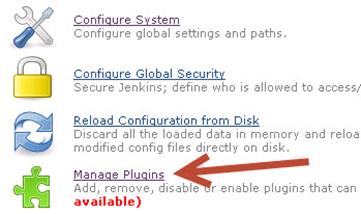
1) In your Jenkins instance, navigate to the Manage Jenkins area and click on the Manage Plugins link.
2) Click on the Available Tab.
3) Under the Filter text box, enter HP.
4) Under the Available tab, look for the name HP Application Automation Tools.

5) Click on the Install checkbox and click on the Download Now and Install After
Restart button.
Configure Jenkins
Once the add-in is installed and you have restarted Jenkins:
- Click on the Jenkins>New Job menu option.
-
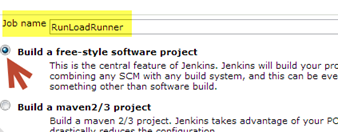
Enter a Job Name – I named my RunLoadrunner – and click on the Build a free-style software project option. Click OK
-
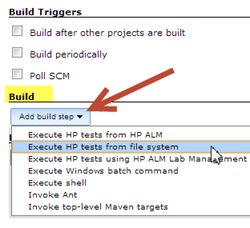
Under the your new project’s configuration scroll down to the Build section and click on the Add build step and click on the Execute HP tests from file system option
-
Under Build you should now have an option for LoadRunner-Specific Settings.. – Click on it.
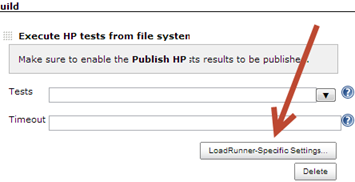
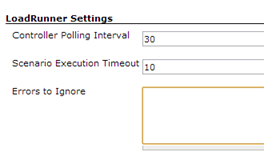
- Under the LoadRunner Settings enter the following:
- Controller Polling Interval – the time to poll the LR Controller for your scenario status
- Scenario Execution Timeout – this is the total time for the execution of all your scenarios
- Errors to Ignore – – during the run you can tell which errors to ignore
-
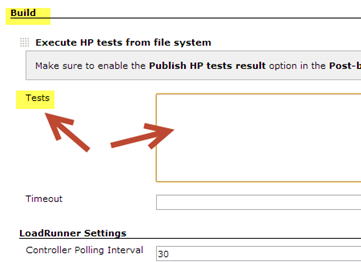
Under the Build/Tests section enter the path to your LoadRunner scenario. For example, my scenario named JnekinsDebug.lrs lives under my D:myLoadRuner directory. So my Tests field = D:myLoadRunner
-
Under the Post-build Actions section click on the Add post-build action and select Publish HP tests result
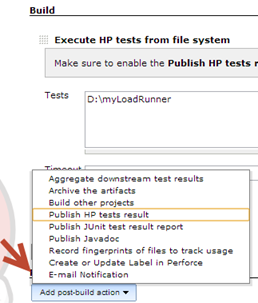
- Apply and Save your settings
- Run the LR job you just created like you would any standard Jenkins job
Set LoadRunner Scenario SLA
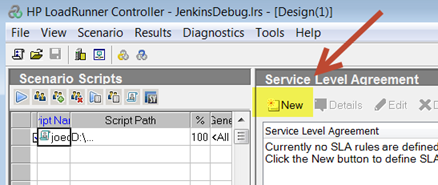
One thing to watch out for is to make sure that your scenario has a SLA defined. If it does not your Jenkins job will fail with a message similar to this:
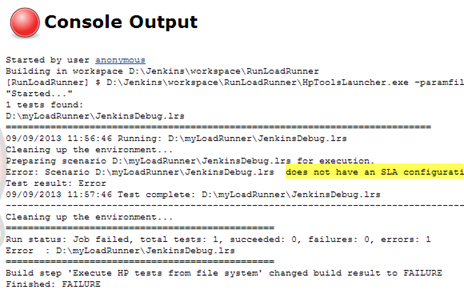
To fix just go into your Scenario in the LoadRunner Controller and add a SLA:
LR Jenkins CI Wrap-up
That is how you integrate LoadRunner with Jenkins. Hope it helps. Let me know if I missed anything.

Joe Colantonio is the founder of TestGuild, an industry-leading platform for automation testing and software testing tools. With over 25 years of hands-on experience, he has worked with top enterprise companies, helped develop early test automation tools and frameworks, and runs the largest online automation testing conference, Automation Guild.
Joe is also the author of Automation Awesomeness: 260 Actionable Affirmations To Improve Your QA & Automation Testing Skills and the host of the TestGuild podcast, which he has released weekly since 2014, making it the longest-running podcast dedicated to automation testing. Over the years, he has interviewed top thought leaders in DevOps, AI-driven test automation, and software quality, shaping the conversation in the industry.
With a reach of over 400,000 across his YouTube channel, LinkedIn, email list, and other social channels, Joe’s insights impact thousands of testers and engineers worldwide.
He has worked with some of the top companies in software testing and automation, including Tricentis, Keysight, Applitools, and BrowserStack, as sponsors and partners, helping them connect with the right audience in the automation testing space.
Follow him on LinkedIn or check out more at TestGuild.com.
Related Posts

Quick Answer Browser-based load testing (also called real-browser load testing) drives real browser sessions through your critical user journeys under […]

HTTP is the protocol web browsers, mobile apps, and test tools use to request information from a server and receive […]

What is Throughput in Performance Testing? Throughput is the amount of work an application completes over a given period. In […]
Concurrent users are the people or virtual users who are active in an application during the same time window. They […]